
AI story bible comparison: what Sudowrite, Novelcrafter, NovelAI and ScribistIQ send to the AI
Story Bible, Codex or Lorebook? A documentation comparison of when each tool's AI actually reads your notes, with one fantasy example set up four ways.

In this guide
All four tools let you write down your characters, places and rules so the AI keeps them straight. Where they differ is when the AI actually reads an entry. ScribistIQ sends its whole Story Bible with every chapter. Sudowrite's Draft looks only at the characters and worldbuilding a scene explicitly mentions. Novelcrafter's Codex and NovelAI's Lorebook send most entries only when a name, alias or key turns up in the text, unless you mark an entry to go in every time. That one difference decides how you should write your notes, and what goes wrong when you don't.[1][7][10][13]
How this comparison was made: it is based on each vendor's own help and pricing pages, checked on 25 November 2026. No tool was tested for this article, so nothing here measures which one writes more consistent prose. ScribistIQ publishes this page; the comparison sticks to what each vendor documents.
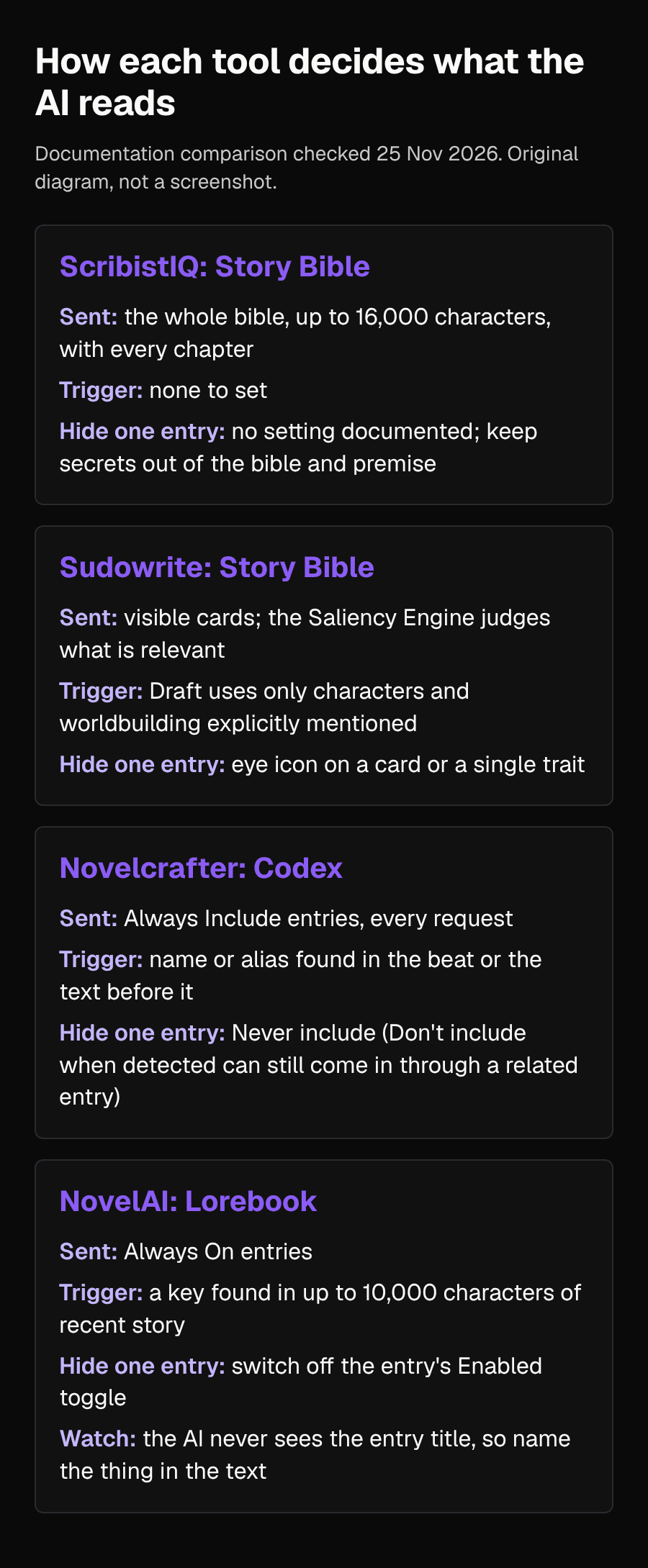
Side by side: how your notes reach the AI
| Tool | Where notes live | What the AI receives | Keeping one fact back | Size limit stated |
|---|---|---|---|---|
| ScribistIQ | The Story Bible. It is started from the Characters & world box on the Pro and Ultra Max generators and can be edited on the left of Write Studio at any time. | The whole Story Bible with every chapter, plus the premise, that chapter's approved outline, summaries of the last 10 chapters, short notes on people and places from earlier chapters, and the last 4,000 characters of the previous chapter. | No per-entry hide setting is documented. | Up to 16,000 characters. |
| Sudowrite | The Story Bible: Braindump, Genre, Style, Synopsis, Characters, Worldbuilding, Outline and Scenes. | Cards that are visible to the AI, which the Saliency Engine filters for relevance. Scene and prose generation in Draft look only at explicitly mentioned Characters and Worldbuilding elements. | The eye icon hides a whole card or one trait from every AI feature. | None stated in the documentation. |
| Novelcrafter | Codex entries for characters, locations, lore and so on. | Entries set to Always Include, entries mentioned in the beat or the text before it, manual scene references, the POV entry, and child entries related to any of those. Empty entries are dropped. | Set the entry to Never include, which keeps it out of every request. Don't include when detected is weaker: the entry is skipped when mentioned, but can still be added by hand or through a related entry that is mentioned. | None stated in the documentation. |
| NovelAI | Lorebook entries. | Entries set to Always On, plus entries whose key appears within the search range, up to 10,000 characters of recent story, each within its token budget. | Switch off the Enabled toggle beside the entry's title. A disabled entry is not inserted even when its key appears. | A token budget you set per entry. |
What that means in practice: a send-everything bible, as in ScribistIQ, never misses a fact because a chapter forgot to name it, but every fact competes for the same 16,000 characters and every fact is in front of the AI in every chapter, so a secret does not belong there until it is no longer secret. Trigger-based notes, as in Novelcrafter, NovelAI and Sudowrite's Draft, let a big world grow without crowding each request, but a fact can be skipped when the chapter never names it, or names it differently from your entry. Neither approach is better in general. The right one depends on how many facts you have and how many must stay hidden for a while.[1][7][10][13]
Worked example: four facts from one fantasy novel
Here is one invented example to make the difference concrete. A fantasy novel is about to reach chapter 14, in which Captain Isel Varro meets a smuggler in a flooded market last seen in chapter 3. The writer has four facts the AI must handle. One plan note before you follow the ScribistIQ column: the example runs to chapter 18. Writing that many chapters in one generation takes the Ultra Max generator at its Epic (20 chapters) or Novel (30 chapters) length, and only the Pro plan includes those lengths, at $169.99 a month. On Lite and Standard a single generation writes up to 12 chapters. You can then extend the finished book with Continue Book, which adds up to 12 new chapters that the model proposes and you approve, at 10,000, 35,000 or 50,000 credits per added chapter for Fast, Pro or Ultra Max. The example assumes the one-generation setup, where you review the whole outline, chapter 18 included, before writing starts. ScribistIQ's pages do not say whether you can rewrite the descriptions of chapters added with Continue Book, so check that before relying on the outline step for fact 2 in an extended book.[3][2][4]
1. Saltcraft (magic rule): every working costs the caster one day of memory. It cannot touch the dead. 2. Captain Isel Varro (secret): she sold the harbour charts to the Tide League. Revealed in chapter 18. No hint before then. 3. Lowmere, which locals call the Drowned Market: flooded in chapter 3. The flood line sits two fathoms up the market wall. Chapter 14 returns there and calls it only 'the Drowned Market'. 4. Varro's brass astrolabe: its lens is cracked.
Each fact carries a different risk. The magic rule must apply in every chapter. The secret must stay away from the AI's attention until chapter 18. The place comes back under its other name, eleven chapters after it last appeared. The astrolabe belongs to a character rather than standing alone. The table shows how to enter each fact in each tool. These settings are an editorial reading of the documentation, not tested results, so check them in your own project.
| Fact | ScribistIQ | Sudowrite | Novelcrafter | NovelAI |
|---|---|---|---|---|
| 1. Saltcraft rule | Put it in the Story Bible. It is sent with every chapter. | Add a Worldbuilding card and name saltcraft in the scene of any chapter that uses it, because Draft uses only elements a scene explicitly mentions. | Set the entry to Always Include. | Set the entry to Always On. |
| 2. Varro's secret | Keep it out of the premise, which goes into every chapter word for word, and out of the Story Bible, which every chapter also receives. When you review the outline before approving it, put the reveal only in chapter 18's description, because each chapter is written from its own outline description. Make sure the descriptions for chapters 1 to 17 do not mention it. | Put it in its own trait on Varro's card and hide that trait with the eye icon until you draft chapter 18. The docs give a hidden murderer's motive as the example, and warn that a visible detail may be judged relevant and appear early. | Keep it in a separate entry set to Never include, then switch it to Include when detected for chapter 18. Avoid Don't include when detected here, because a related entry can still bring it in. | Give it its own entry with the Enabled toggle switched off, so it is not inserted even if a key appears, then switch it on for chapter 18. |
| 3. Lowmere / the Drowned Market | Write both names and the flood line in one entry. No trigger is needed, but the AI can only link the names if the bible does. | Write both names on the card, and name the place in the chapter 14 scene. The Story Bible docs do not describe alias matching. | Add 'Drowned Market' as an alias. Mentions match names and aliases, case-insensitive by default. | Add both names as keys. Keys are case-insensitive, and an entry fires when a key appears within the search range. |
| 4. The cracked astrolabe | Write it on Varro's line in the cast list. | Add it as a trait on Varro's character card. | Give it its own entry and relate it to Varro, so it comes in as a child entry whenever Varro is mentioned. | Write it inside Varro's entry text and name Varro in that text, because the AI never sees the entry title. |
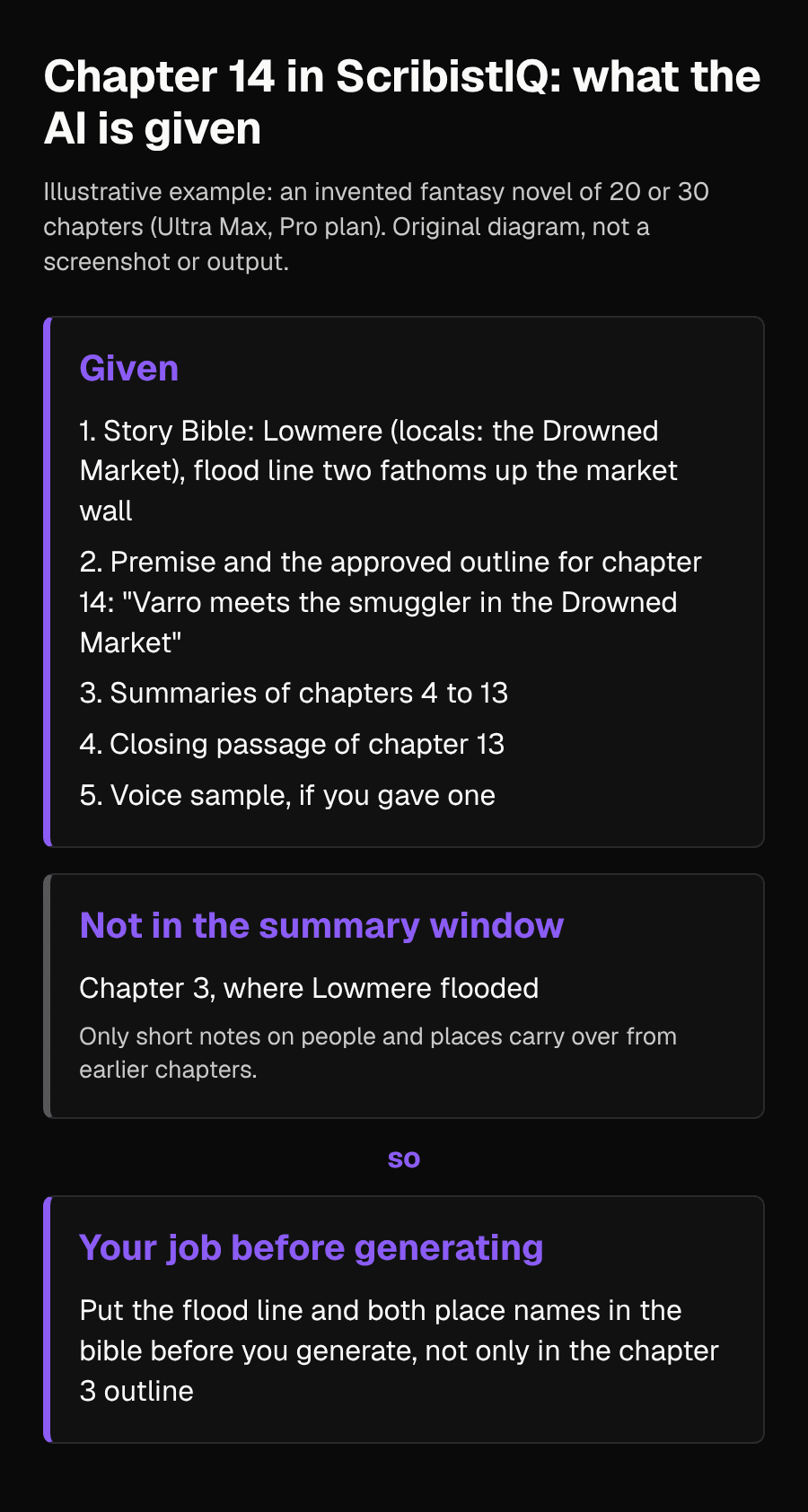
The chapter 14 case shows why fact 3 matters in ScribistIQ. For chapter 14 the AI gets the Story Bible, the premise and the chapter's outline, summaries of chapters 4 to 13 with up to 20 fixed details each, short notes on people and places, and the closing passage of chapter 13. Chapter 3, where the market flooded, is outside the summary window. If the flood line exists only in your chapter 3 outline, the AI may not have it when it describes the market wall in chapter 14. Put it in the bible before you generate. ScribistIQ's own guide reports a 20-chapter test written without a Story Bible: of 12 tracked details, 7 held, 4 were contradicted and 1 was dropped, and the details invented along the way were the ones that drifted.[2][1]
Before you enter notes in any tool: sort each fact
Ask these five questions of every fact on your list. The answers tell you which setting to use, whichever tool you pick.
- Must the AI know it in every chapter? Narration rules, magic costs and name spellings usually qualify. Put them in the ScribistIQ Story Bible, set them to Always Include in Novelcrafter or Always On in NovelAI, and in Sudowrite name them in every scene that relies on them.
- Must it stay hidden until a set chapter? Hide the Sudowrite trait with the eye icon, set the Novelcrafter entry to Never include, and switch off the NovelAI entry's Enabled toggle. In ScribistIQ keep it out of the premise and the Story Bible, and put the reveal only in that chapter's outline description.
- What other names will the text use? List nicknames, titles and plurals. Novelcrafter adds English plurals automatically but needs irregular ones, such as wolves for wolf, as aliases. NovelAI keys ignore case, but keys written as regular expressions between slashes are case-sensitive.
- Does it belong to someone else? Attach it to that character's entry or card, or, in Novelcrafter, relate the entries so the owner brings it in.
- How long is it? Short entries leave room for others. ScribistIQ's bible stops at 16,000 characters, and NovelAI lets you cap each entry's token budget and choose which entries are inserted first.
Which tool fits which writer
| Tool | Best for | Main limit for your notes | Price checked 25 Nov 2026 |
|---|---|---|---|
| ScribistIQ | Generating a whole book from an approved chapter plan, with notes that reach every chapter without setting any triggers. | 16,000-character bible, no documented per-entry hide, and the Characters & world box only on the Pro and Ultra Max generators. On Lite and Standard one generation writes up to 12 chapters, and Continue Book can extend a finished book afterwards. Only the Pro plan writes 20 or 30 Ultra Max chapters in one generation. | Lite is $29 a month billed monthly (annual billing saves up to 20%) for 300,000 credits, which covers one Pro book of 5 to 12 chapters, about 40,000 words. Each added chapter, including with Continue Book, costs 10,000, 35,000 or 50,000 credits (Fast, Pro or Ultra Max). Writing 20 or 30 chapters in one generation, as in the worked example, needs the Pro plan, $169.99 a month. A free account writes your book's first chapter, about 500 to 700 words, with no card. |
| Sudowrite | Drafting chapter by chapter with a bible that feeds the synopsis, outline, scenes and prose. | Draft ignores elements a scene does not mention, and a visible detail can surface early unless you hide it. | Billed monthly: $19 a month (Hobby & Student, 225,000 credits) to $59 a month (Max, 2,000,000 credits). Billed yearly: $10 to $44 a month. Free trial with no credit card. |
| Novelcrafter | Large casts and series where you want per-entry control over what is sent. | You bring your own AI key, so model use is billed by your provider, and aliases and irregular plurals need upkeep. | $4 to $20 a month on monthly billing. The Codex is on every plan and AI features start at Hobbyist, $8. 21-day free trial with no card. |
| NovelAI | Passage-by-passage storytelling with lore that appears when its keywords do. | A key must appear within the search range, and the AI never sees entry titles. | Subscriptions start at $10 a month, with a trial period. |
This list is unranked. The biggest split is whether you want the AI to generate the whole book from a plan, or to help you draft it scene by scene. After that, the question is how much trigger management you want: none in ScribistIQ, some in Sudowrite, and full control in Novelcrafter and NovelAI. For everything else these tools do, see the full comparison pages linked below.
Moving notes into ScribistIQ from another tool
ScribistIQ's comparison pages say you can paste Sudowrite Story Bible entries or Novelcrafter Codex entries into the characters-and-world notes, where they are parsed into the Story Bible. Before you paste, rewrite anything that relied on a trigger. Put each alias inside the entry text. Take each hidden fact out of the notes and plan to put it only in the outline description of the chapter that reveals it. Then trim the whole set to fit within 16,000 characters, keeping the facts every chapter needs.[5][6][1]
Check the first chapters
- Search the draft for every alias. Where a place or person appears under another name, are your facts used?
- Look for any held-back fact that surfaced early, including a hint rather than a statement.
- Check each always-on rule, such as the saltcraft cost, in every chapter that uses it.
- In ScribistIQ, the continuity scan on Pro plans costs 3,000 credits per chapter, lists contradictions with the passage and the earlier fact, and changes nothing on its own. Facts you add to the Story Bible apply to every chapter written, regenerated or continued afterwards.
Limits
This compares documented behaviour, not output quality. Vendor help pages change, and some selection logic, such as how Sudowrite's Saliency Engine judges relevance, is not described in detail. Context sizes differ by model and plan and are not compared here. The worked example is invented, and its settings are untested suggestions. Recheck each vendor's current pages before you commit a long project to one tool.[8][13]
Sources
- How to keep characters consistent in an AI-written novel, ScribistIQ guideChecked 2026-11-25
- ScribistIQ featuresChecked 2026-11-25
- ScribistIQ plans and pricingChecked 2026-11-25
- Write a fantasy novel with AI, ScribistIQChecked 2026-11-25
- ScribistIQ vs SudowriteChecked 2026-11-25
- ScribistIQ vs NovelcrafterChecked 2026-11-25
- What is Story Bible? Sudowrite documentationChecked 2026-11-25
- Visibility settings, Sudowrite documentationChecked 2026-11-25
- Sudowrite pricingChecked 2026-11-25
- How is Codex context added in Novelcrafter prompts? Novelcrafter helpChecked 2026-11-25
- Codex mentions, Novelcrafter helpChecked 2026-11-25
- Novelcrafter pricingChecked 2026-11-25
- Lorebook, NovelAI documentationChecked 2026-11-25
- NovelAI home pageChecked 2026-11-25