
How to turn your personal story into a book with ScribistIQ
A beginner walkthrough from memory packet to exported memoir in ScribistIQ: Pro generator, outline editing, deliberate generation and edits, with one illustrative example.
By ScribistIQ ·
Prepared with AI assistance and automated editorial checks. Examples labeled illustrative are invented to explain the method.
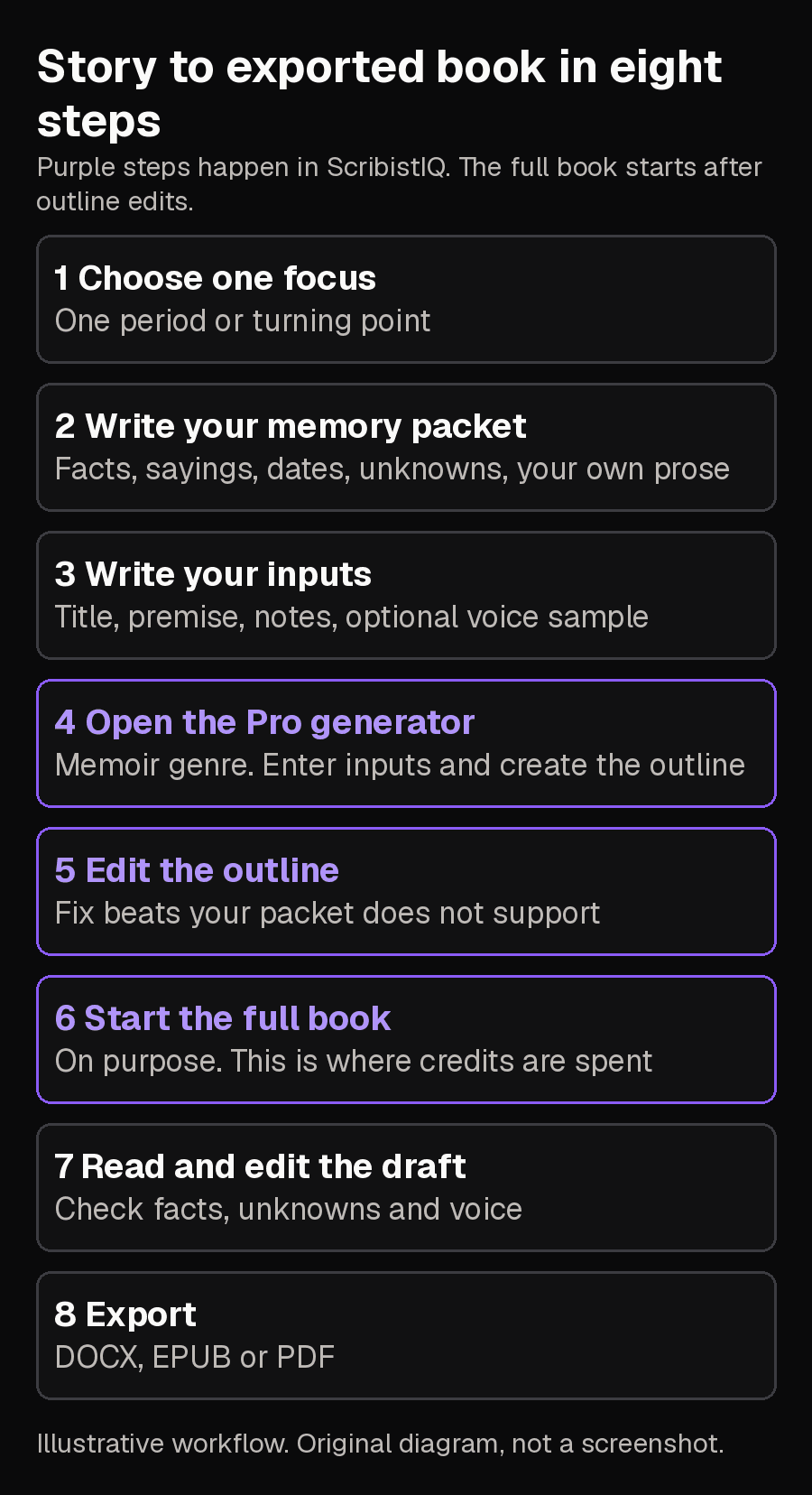
This walkthrough takes one personal or family story from memory to an exported book in ScribistIQ. You write a short memory packet, turn it into a title, premise, notes and optional voice sample, give those to the Pro generator with the Memoir genre, edit the chapter outline it proposes, start the full book on purpose, then check, fix and export it. One invented example, Dana and her mother's laundromat, runs through every step. Everything labeled illustrative is made up; it is not a real person's life or real ScribistIQ output.
The method rests on one fact from ScribistIQ's memoir page: the model does not research anyone and uses only what you supply, and its non-fiction rules bar invented quotations, statistics and named people. So you do the remembering and checking. The software does the drafting.[1]
One memoirist's dated account shows why the checking matters. In May 2026 she gave an AI her own messy draft fragments and asked for a finished essay in her voice; she found the result hollow, and tightening her instructions did not help. That is one author's experience, not a measure of how many writers feel the same.[8]
What you need before you start
- A ScribistIQ account on a paid plan. A free account can write by hand and gets a free opening chapter of its own book, but the Write Studio guide says free accounts cannot use its AI actions. The Pro generator is included in every paid plan: Lite is $29 a month with 300,000 credits, and one Pro book costs 300,000 credits. The Pro generator is not the same thing as the higher Pro subscription.
- About an hour to write the packet in step 2. It decides how accurate the book is.
Step 1: Choose one focus
Pick one period, relationship or turning point and write one sentence naming a person or place and a change. This is a practical way to keep the packet small enough to check; it is not a ScribistIQ requirement. Dana's focus: the summer she was 15 and worked in her mother's laundromat, the summer her mother turned down an offer to buy the shop. 'My childhood' would be too broad to check.
Step 2: Write your memory packet
List specific things you know: people, places, moments, exact sayings, dates you are sure of, and what you do not know. Where you can, confirm details with someone who was there or with a document. A vendor guide to AI memoirs suggests asking relatives to fill gaps and using scanned documents to verify details, and warns that AI may standardize family sayings and slang, so keep those words as spoken.[7]
FOCUS: The summer of 1998, working in Mum's laundromat, and the offer she turned down. PEOPLE: Mum (Ife), who ran the laundromat. Uncle Tunde, who fixed the machines. Mrs. Park, a regular customer. PLACES: Corner laundromat on Route 9. The back room with the folding table. MOMENTS: A washing machine failed and flooded the floor. A man offered to buy the shop and Mum said no. My first paid shift and the pay envelope. SAYING (exact words): Mum: "Clean is a promise." DATES I AM SURE OF: Summer 1998. I was 15. Tunde confirmed the flood was in July. UNKNOWN: Why Mum refused the offer. She never told me. MY OWN WRITING: Two paragraphs from an email I wrote to a friend about that summer.
The UNKNOWN line matters most. A gap left silent invites a made-up motive, which then reads like part of your life. You will state it as unknown in the inputs rather than leave it out.
Step 3: Turn the packet into your inputs
Before you open the generator, write the four things you will give it: a book title, a premise for the arc of the story, notes with the facts and exact sayings, and, if you want one, a voice sample. The features page says a voice sample is available on Pro and that the model matches its style, not its content, so it should be only prose you wrote yourself. The map shows where each part of Dana's packet goes.[1][2]
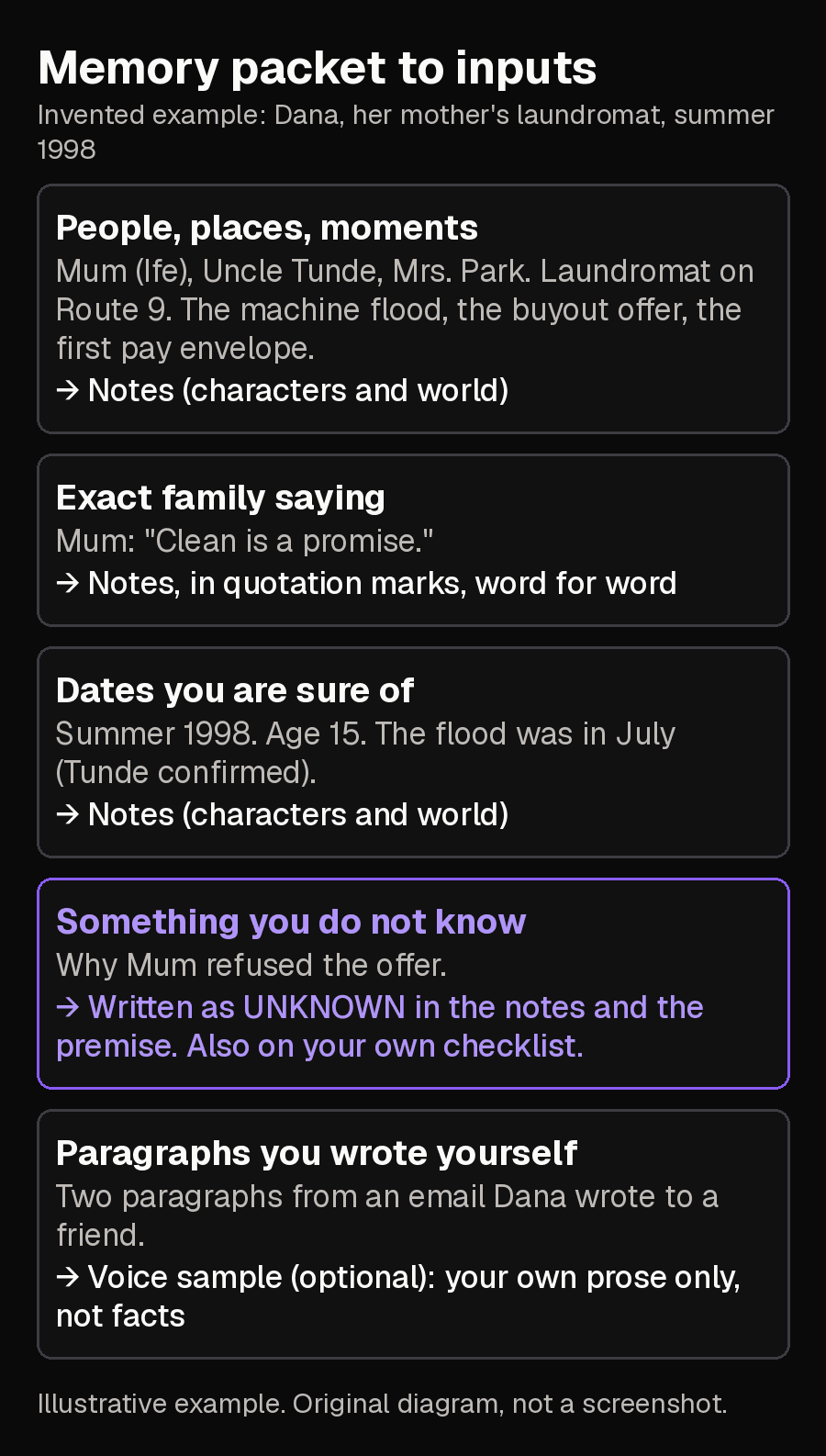
Clean Is a Promise
A memoir told by Dana as an adult about the summer of 1998, when she was 15 and worked in her mother's laundromat on Route 9. The story runs from her first paid shift to the day a man offered to buy the shop and her mother said no. Dana does not know why her mother refused. The book must say so and must not explain it. First person, looking back, plain and warm.
PEOPLE: Mum (Ife) ran the laundromat. Uncle Tunde fixed the machines. Mrs. Park was a regular customer; use her only where a memory is written here. PLACES: Corner laundromat on Route 9. The back room with the folding table. EVENTS: A machine failed and flooded the floor in July (Tunde confirmed). A man offered to buy the shop and Mum said no. My first paid shift and the pay envelope, summer 1998, age 15. EXACT WORDS: Mum said: "Clean is a promise." UNKNOWN: Why Mum refused the offer. Write it as unknown. Do not invent a reason. RULES: Use only what is in these notes. Do not invent names, quotations, dates or events.
Dana's voice sample would be the two paragraphs from her email to a friend. Leave it out if you have no prose of your own to paste.
Step 4: Open the Pro generator and create the outline
- Sign in at scribistiq.com, or create an account.
- Open the book generators and choose the Pro generator. The FAQ describes picking a generator from Fast, Pro and Ultra Max, and Pro as the one for full-length books with control.
- Choose the Memoir genre, one of the genre presets on the features page. On Pro, the memoir page says the memoir preset is applied.
- Enter Dana's title, premise and notes, add the voice sample if you have one, and choose a length. Pro books run five to twelve chapters.
- Ask for the outline. On Pro, the outline is shown for review before any chapters are written.
Step 5: Review and edit the outline
The memoir page says that on Pro you review and edit the chapter plan before it writes, and the features page says you can rewrite any chapter beat. Check each beat against your packet. Remove or rewrite anything it does not support.[1][2]
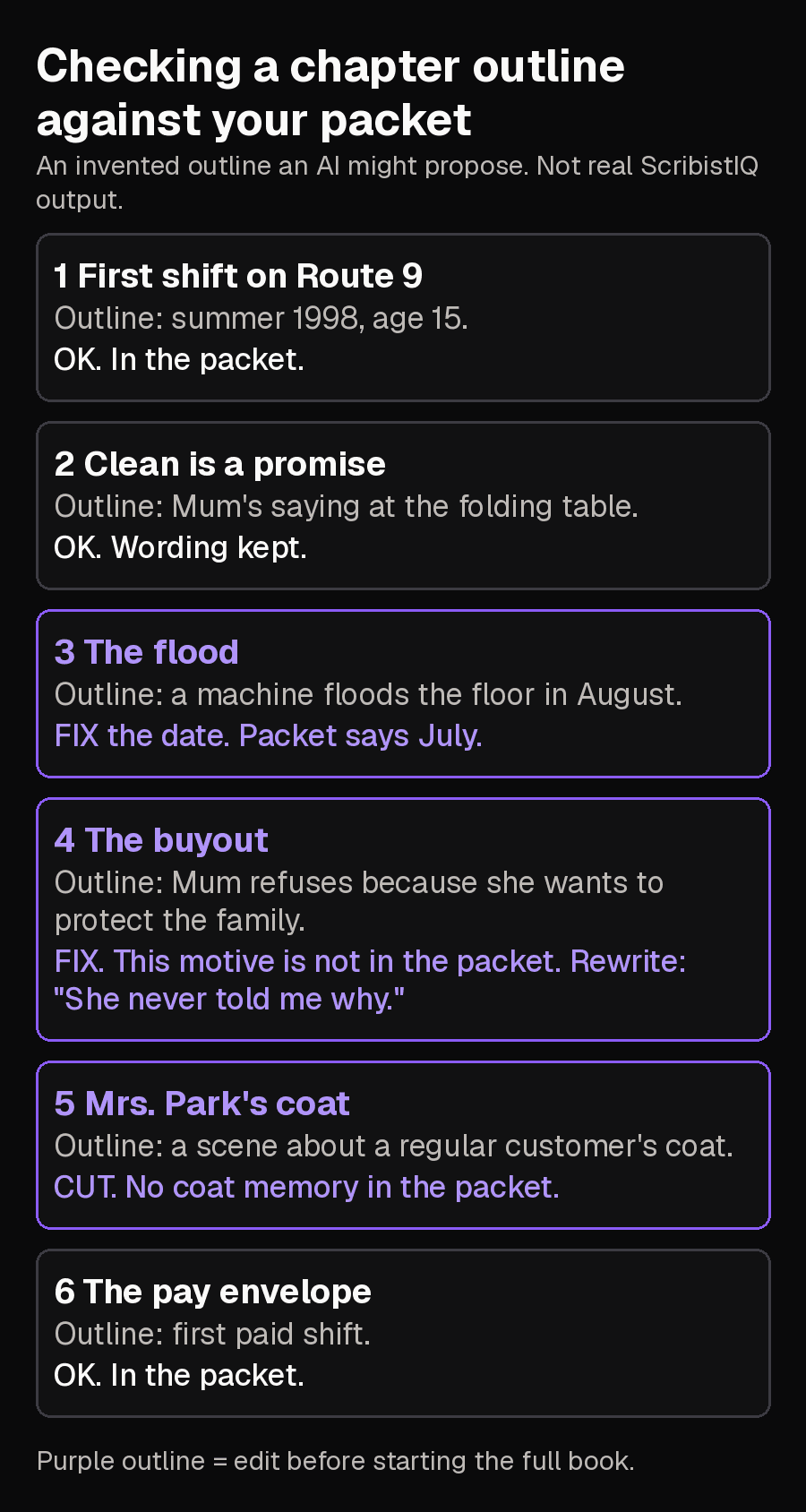
Ch 3, The flood. Outline says August. My packet says July. Change the beat to July. Ch 4, The buyout. Outline says Mum refuses because she wants to protect the family. That reason is not in my packet; I wrote that I do not know. Change the beat to: A man offers to buy the shop. Mum says no. I never learned why. Ch 5, Mrs. Park's coat. My packet has no coat memory. Delete the chapter.
Step 6: Start the full book on purpose
Starting the full book is the step that spends credits: 300,000 for a Pro book. Do it only once the outline matches your packet. The FAQ says credits are refunded automatically if a generation fails server-side, and that you can keep working in another tab while it runs.[5][6][1]
Step 7: Read and edit the draft
- Facts: highlight every name, date, place and quotation and find each in your packet. Delete or replace anything that is not there.
- Unknowns: find every sentence that explains why someone did something. Keep it only if it is your own interpretation.
- Sayings: confirm the exact words you gave survived unchanged.
- Voice: read three paragraphs aloud. If they do not sound like you, rewrite them in your own words.
BEFORE (a sentence an AI might write): Mum stood among the humming machines, her quiet determination reflecting a lifetime of sacrifice, and declared that the shop would never be sold. CHECK: 'Lifetime of sacrifice', 'determination' and 'declared' are not in the packet. The packet says only that a man offered to buy the shop, Mum said no, and the reason is unknown. AFTER: A man offered to buy the shop. Mum said no. She never told me why.
To change a passage, open the book in the editor. The FAQ describes an AI assist bar that offers Rewrite, Shorten, Expand and Continue on selected text or the end of a chapter, and the Write Studio guide says its suggestions appear as tracked changes that change nothing until you accept them. You can also type the fix yourself.[6][3]
Step 8: Export
Export gives DOCX, EPUB and PDF with no watermark. For a printed family copy or for store listings, follow ScribistIQ's publishing guide, which covers file choice, print ordering and each store's rules.[4][2]
Other ways to do it
| If you would rather | Use | Note |
|---|---|---|
| Write most sentences yourself | Write Studio (co-write) | Story Bible on the left, manuscript in the middle, an AI chat on the right. |
| Have each chapter written against a continuity bible | Ultra Max | Costs more; see the features page. |
| Try the idea cheaply | Fast | One pass, with no documented outline review, so a weaker fit for a personal story where you want to correct the plan before chapters are written. |
Limits and method
- The steps follow what ScribistIQ's public pages document. Exact button and field wording on screen may differ, so follow the on-screen options. No outline or book was generated for this guide, and the example is invented.
- Nothing here promises the draft will sound like you. Your step 7 read-through is the test.
- Plans and credit costs can change. Memoirs describe real people, so consider their privacy before sharing.
Sources
- ScribistIQ memoir generator pageChecked 2026-11-02
- ScribistIQ featuresChecked 2026-11-02
- ScribistIQ guide: co-write with Write StudioChecked 2026-11-02
- ScribistIQ guide: publish an AI bookChecked 2026-11-02
- ScribistIQ pricingChecked 2026-11-02
- ScribistIQ FAQChecked 2026-11-02
- Storii vendor guide to AI-assisted memoirs, March 19, 2026Checked 2026-11-02
- Alison Wearing, firsthand post on AI and memoir, May 29, 2026Checked 2026-11-02