
How to plot a thriller twist with AI: plant fair clues without giving it away
Decide the twist first, put the truth and a reveal rule in the premise, place one clue per outline entry, then read the AI draft twice. One invented thriller shows each step.

In this guide
A thriller twist only works if two things are true: the clues were on the page all along, and the reader did not see the answer coming. When AI drafts the chapters, a third problem appears. To plant fair clues the model has to know the truth, and whatever you tell it is in front of it while it writes chapter 2 as well as chapter 10. This guide shows how to plan a twist for a ScribistIQ thriller so the clues land where you want them and the answer stays hidden until the chapter you choose.
The short answer: decide the truth, the reveal chapter and each clue before you generate. Write the truth once, in the premise, joined to a rule that says when the reader learns it. Put each clue in a specific chapter of the outline as a concrete thing the protagonist sees, and make the reveal chapter name every clue it pays off. Then read the draft twice: once as a reader, once against your clue list. The example book below, The Night Crossing, is invented to show the method, and the method itself is editorial advice rather than a tested result.
What the AI can see while it writes each chapter
ScribistIQ writes one chapter at a time and does not reread the whole book. With each chapter it sends your premise word for word, that chapter's entry from the outline you approved, the Story Bible if the book has one (up to 16,000 characters of characters, places and facts, marked as facts the chapter must not contradict; it is built from the Characters and world box, or when you first open the book in Write Studio), summaries of the last 10 chapters with up to 20 fixed details each, short notes on the people and places established earlier, and roughly the last 4,000 characters of the previous chapter.[2]
That has three consequences for a twist. First, anything in the premise or the Story Bible is visible to every chapter, including the early ones, so the secret needs a rule about when it may surface. Second, the outline entry is the one input that differs chapter by chapter, so it is where each clue belongs. Third, a reveal chapter sees only summaries of earlier chapters, not their full text, and a small clue may not be one of the fixed details a summary keeps. Naming the callbacks in the reveal chapter's outline entry reduces that risk. In a book longer than 11 chapters, a clue planted more than 10 chapters before the reveal is also outside the summaries it sees. The short notes on earlier people and places still reach it, but nothing says a small object such as a missing phone charger would be recorded there, so name it in the reveal entry anyway.[2]
The Thriller preset helps. Its fourth directive says to withhold information the protagonist does not have and let the reader catch up with them, not ahead of them. The directives are added to every chapter prompt on the Pro and Ultra Max generators and are reapplied when you regenerate a chapter or use AI assist in the Write Studio. A directive is guidance for the model, not a guarantee, which is why the steps below spell the reveal timing out in your own inputs.[1]
Before you start: generator, length and cost
| Choice | Fits a twist? | Cost and plan (checked November 18, 2026) |
|---|---|---|
| Fast generator | No. It writes the book in one pass, in fiction mode without the Thriller preset, so there is no chapter plan to check first. | 50,000 credits for 3 to 7 chapters. |
| Pro generator | Yes. Applies the Thriller preset, and you review and edit the chapter plan before any prose is written. | 300,000 credits for 5 to 12 chapters. On every paid plan; a Lite allowance ($29 a month, 300,000 credits) covers one Pro book. |
| Ultra Max generator | Yes. Applies the preset and writes each chapter against the continuity bible. | 50,000 credits for the outline plus 50,000 per chapter, so 650,000 for 12 chapters. Lite and Standard are capped at 12 chapters; the 20- and 30-chapter lengths are on the Pro plan only. |
The example uses 12 chapters so it fits the Pro generator and every paid plan. A longer book gives more room for clues, but the planning is the same.[4]
Step 1: Write a twist sheet before you open ScribistIQ
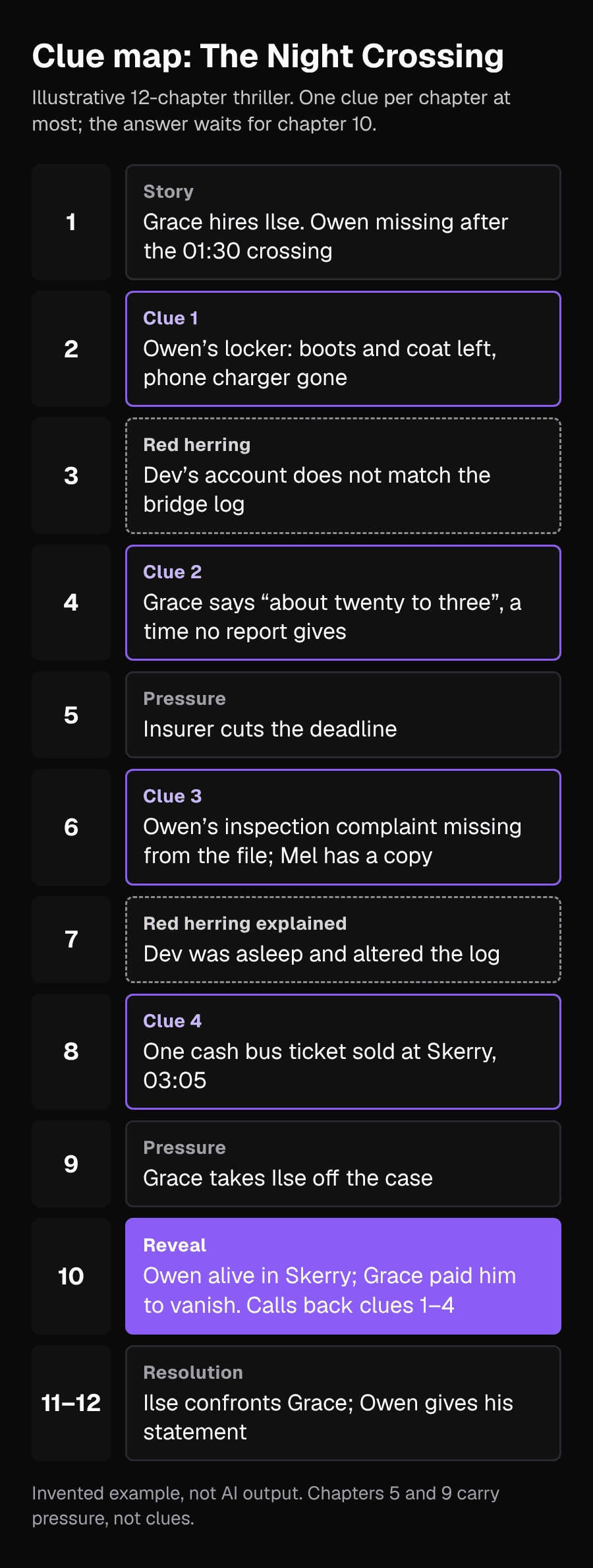
Put the whole twist on one page first. The sheet has five parts: the surface story everyone believes, the truth, the chapter where the truth comes out, the fair clues with the chapter each one appears in, and any red herring with its own innocent explanation. Use these rules for each clue:
- Make it a physical, checkable detail: an object, a time, a document, a ticket. A narrator saying something feels wrong is a hint, not a clue.
- Give it an innocent reading at the moment it appears. A missing charger could mean Owen kept it in his pocket.
- Space the clues out; this example uses one per chapter at most, so no single chapter gives the game away.
- Give the red herring its own true explanation, and reveal that explanation before the twist so the reader is not left with a loose end.
- Check that a reader could reach the answer from the clues alone, without information only the author has.
| Chapter | What happens | Role |
|---|---|---|
| 1 | Grace hires Ilse; Owen is missing after the 01:30 crossing | Surface story |
| 2 | Owen's locker: boots and coat left, phone charger gone | Clue 1 |
| 3 | Dev's account of the night does not match the bridge log | Red herring |
| 4 | Grace says Owen went over 'at about twenty to three', a time no report gives | Clue 2 |
| 5 | The insurer cuts the deadline | Pressure |
| 6 | Owen's complaint about the March inspection is missing from the company file; Mel has a copy | Clue 3 |
| 7 | Dev admits he was asleep and altered the log to keep his licence | Red herring explained |
| 8 | One cash bus ticket was sold at Skerry at 03:05 | Clue 4 |
| 9 | Grace takes Ilse off the case | Pressure |
| 10 | Ilse finds Owen alive in Skerry; Grace paid him to vanish | Reveal |
| 11-12 | Ilse confronts Grace; Owen gives his statement | Resolution |
Step 2: Write the truth into the premise with a reveal rule
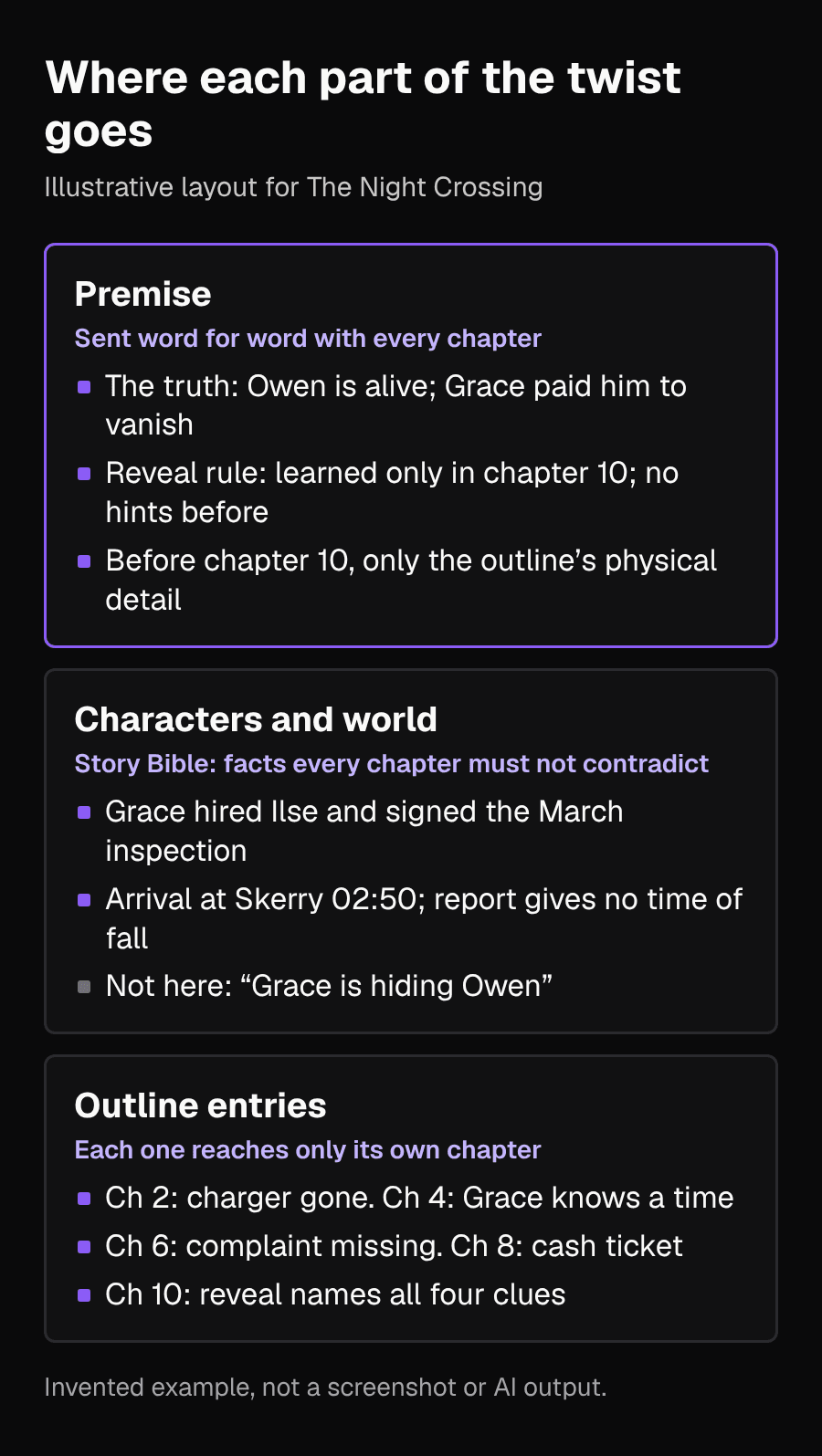
In the generator, enter your title and premise and choose the Thriller preset. The model cannot plant consistent clues for a truth it does not know, so tell it. Because the premise goes into every chapter word for word, keep the truth and the reveal rule in the same place, so no chapter ever sees one without the other. State numbers and times outright; the continuity guide recommends this for any fact that must hold.[3][2]
The Night Crossing. Ilse Marr, 38, an insurance investigator, is hired by ferry operations manager Grace Holt to confirm that deckhand Owen Pike, 26, was lost overboard from the 01:30 night crossing from Harlow to Skerry, so the claim can be paid within 14 days. The truth: Owen is alive. He knew the ferry's March safety inspection, which Grace signed, never took place. Grace paid him to disappear in Skerry so he could not take his complaint to the regulator, and staged his loss overboard. Reveal rule: Ilse and the reader learn that Owen is alive and that Grace hid him only in chapter 10. Before chapter 10, no narration, thought or dialogue states or hints that Owen is alive or that Grace is involved. The only evidence before chapter 10 is the physical detail named in that chapter's outline entry, and Ilse does not explain what it means. Captain Dev Okafor lies about being on the bridge that night because he was asleep in his cabin. This comes out in chapter 7 and has nothing to do with Owen.[2][1]
The rule says what is forbidden (stating or hinting at the truth), when that ends (chapter 10) and what is allowed before then (the physical detail in each outline entry). A vague instruction such as 'keep the twist secret' gives the model nothing to check a chapter against.
Step 3: Keep Characters and world to facts that stay true
On Pro and Ultra Max, the Characters and world box is seeded into the story bible before chapter 1, and every chapter treats it as facts it must not contradict. The Thriller page also suggests naming point-of-view characters there so the outline assigns them correctly.[3][2][1]
Enter your notes in that box when you set up the book. For a twist, write entries that are true before and after the reveal. 'Grace hired Ilse and signed the March inspection certificate' stays true in chapter 10. 'Grace is a trustworthy client' would contradict the ending, and 'Grace is hiding Owen' would put the secret in a second place without its rule.
Ilse Marr, 38: insurance investigator, point-of-view character in every chapter. Careful, dry, behind on her own rent. Grace Holt, 51: operations manager of the ferry company. Hired Ilse. Signed the March safety inspection certificate. Owen Pike, 26: deckhand on the 01:30 crossing. Has a sister, Mel, who still has his emails. Dev Okafor, 60: captain of the night ferry for 22 years. Harlow: home port. Skerry: the far town. The 01:30 crossing arrives at Skerry at 02:50. The official report says only that Owen was missed when the ferry docked at Skerry. It gives no time for his fall. The insurer will pay the claim if it is confirmed within 14 days of the crossing.[2]
Step 4: Check the outline before you approve it
On Pro and Ultra Max you see the whole outline before any chapter is written and can rewrite any chapter beat. Asked whether it plants and pays off twists, the Thriller page answers that because you can see and edit the whole outline before writing starts, you can place the reveals where you want them. Placing the clues is the same job, done in the same review, and the checks below are how to do it. Outline review is included on every paid plan.[3][1][4]
- Each clue sits in the chapter your sheet planned, written as something Ilse sees, hears or reads.
- No entry before chapter 10 uses words such as 'suspects Grace', 'realises' or 'begins to wonder whether Owen survived'.
- No entry explains what a clue means. 'Notes the missing charger' is fair; 'realises Owen packed for a trip' is a reveal.
- The red herring has its explanation in chapter 7, before the twist.
- The chapter 10 entry names every clue it calls back, with its chapter number.
- Every entry is told from Ilse's point of view, and the chapter endings promise a question or a cliff rather than an early answer.
The Thriller preset tells every chapter to end on a question, a reveal or a cliff. Before chapter 10, check that each ending is a question or a cliff, or a reveal about something other than the twist, such as Dev's confession in chapter 7.[1]
Chapter 2 (rewritten): Ilse searches Owen's locker in Harlow. His work boots and coat are still there; his phone charger is not. She notes it with the other contents and moves on. Ends on Mel refusing to talk to her. Chapter 4 (rewritten): Grace walks Ilse through the claim and says Owen went over 'at about twenty to three'. Ilse writes the time down. Ends on Grace asking Ilse to sign the report by Friday. Chapter 10 (rewritten): In a rented room above a Skerry bakery, Ilse finds Owen alive. He admits Grace paid him to vanish so he would not take his complaint about the March inspection to the regulator. Ilse connects the missing charger (ch 2), Grace knowing a time no report gave (ch 4), the complaint missing from the company file (ch 6) and the single cash bus ticket sold at Skerry at 03:05 (ch 8).
Approve the plan only when all six checks pass. Reviewing the outline is free; fixing a spoiled chapter after generation costs AI actions or rereading time.[4]
Step 5: Read the finished draft twice
Writer Matt Kelland described a useful pattern in January 2026 when checking the foreshadowing in his own novel. He had NotebookLM read the draft alone, like a reader who knows only the text, which showed what a reader would assume at each point. Then he added his outline, like a reader who knows the ending, which showed whether the setups supported the payoffs. The same split works for a generated thriller, done by you and, ideally, by one reader who does not know the twist.[6]
- Reader pass: read straight through and mark the first sentence that made you suspect the truth. If it comes well before the clue that should have raised it, look for a hint the model added.
- Clue pass: with the twist sheet beside you, tick each clue: present, in its planned chapter, and not explained early. Then check that chapter 10 actually calls back all four.
- If you are on the Pro plan, the Deep Manuscript Audit reads the whole book across twelve editorial dimensions, including plot logic, and the Thriller page says it checks setup and payoff. It costs 40,000 credits per chapter (480,000 for 12 chapters); re-running it on an unchanged manuscript is free.
- To compare each chapter with its outline entry beat by beat, use the plan ledger in the related guide on whether AI follows your chapter plan.
Step 6: Fix an early hint in the Write Studio
A single stray thought can spoil the twist. If the slip is one sentence, the cheapest fix is to delete it by hand in the Write Studio, which costs nothing. If the paragraph needs a new ending, use an AI rewrite:[5]
- Choose Co-write in the sidebar, then Co-write on the book's card. Pick the chapter from the chapter menu.
- Select the paragraph and choose Rewrite. The suggestion streams in as tracked changes. This is one AI action.
- When it finishes, type a note and choose Apply. Apply makes a new suggestion for the original selection; it does not accept anything, and it is a second action.
- Choose Accept to keep the suggestion or Reject to discard it.
- Wait for Saved above the editor before you leave, or use the Save button.
Chapter 6 last paragraph (the slip you might find): She closed the file. Unless Owen had never gone into the water at all. Note typed before choosing Apply: End the chapter on the missing complaint and Mel's copy of it, not on whether Owen is alive. Ilse does not suspect he is alive until chapter 10. What a suggestion you would accept does: it ends on the copy of the complaint in Mel's inbox and the question of who removed the original from the company file, with no thought about Owen being alive.[5]
Each Rewrite, Apply or Try again is a separate action: 500 credits at the Fast tier or 3,000 at the Pro tier, so the example costs 1,000 or 6,000 credits. AI actions need a paid plan, and the monthly action allowance is a hard limit even if you have credits left. The Thriller directives are reapplied to AI assist, so the rewrite still follows the withhold-information rule.[5][3][1]
Common problems and what to do
| Problem | Likely cause | What to change |
|---|---|---|
| An early chapter hints at the truth | The truth is in the premise or notes without a rule about when it may surface | Join the truth and a reveal-chapter rule in the premise, and remove the secret from Characters and world |
| The reveal feels unearned | The reveal chapter's outline entry does not name the clues | List each clue and its chapter in the reveal entry before approving the plan |
| A clue never appears | Its outline entry described its meaning, or it was not in an entry at all | Rewrite the entry as a concrete detail the protagonist sees |
| The red herring is never resolved | Its explanation was not given a chapter | Add the explanation to an outline entry before the twist |
| Procedural details look wrong | The model does not research real procedures, weapons or jurisdictions | Treat insurance, maritime or police detail as a draft to verify |
Limits to keep in mind
The twist sheet, reveal rule and outline checks are an editorial method that has not been tested against generated books, and The Night Crossing is an invented example, not AI output. No input can guarantee the model never hints early; the checks are there to catch it. Your own reader pass is limited because you already know the answer, so a reader who does not is worth more. Plan names, prices and allowances were checked on November 18, 2026 and can change, and ScribistIQ writes in English only.[3][4]
Sources
- ScribistIQ Thriller preset page: directives, generators, Good to know and FAQChecked 2026-11-18
- Keeping an AI-written novel consistent: what the AI sees with each chapter (ScribistIQ guide)Checked 2026-11-18
- ScribistIQ features: generators, inputs, outline review, Deep Manuscript Audit, Write StudioChecked 2026-11-18
- ScribistIQ pricing: plans, allowances and plan-only featuresChecked 2026-11-18
- How to co-write a novel with AI in ScribistIQ's Write StudioChecked 2026-11-18
- Using NotebookLM to help with foreshadowing (Matt Kelland, Substack, January 25, 2026)Checked 2026-11-18