
Guide
How to finish your novel with AI
If your draft stalled, you can bring it into ScribistIQ and have the next chapters written from where you stopped. You stay in charge of the story: the AI proposes what happens next, you change it, and nothing is written until you start it.
The short answer
- Upload a .docx, .txt or .md file (up to 4 MB) or paste the text. Importing costs no credits.
- The AI plans up to 12 next chapters per run. You edit, add or delete them before anything is written.
- Each new chapter is written with your Story Bible, summaries of your last 10 chapters and the end of the chapter before it in view. It does not reread the whole book.
- It needs a paid plan or an active trial. New chapters cost 35,000 credits each at Pro quality or 50,000 at Ultra.
The whole flow in two minutes, recorded in the real app with a short sample manuscript. The wait while chapters are written is sped up.
From a stalled draft to the next chapters
Every step below is what the app does today, checked against the product on October 7, 2026.
- 01
Import the manuscript
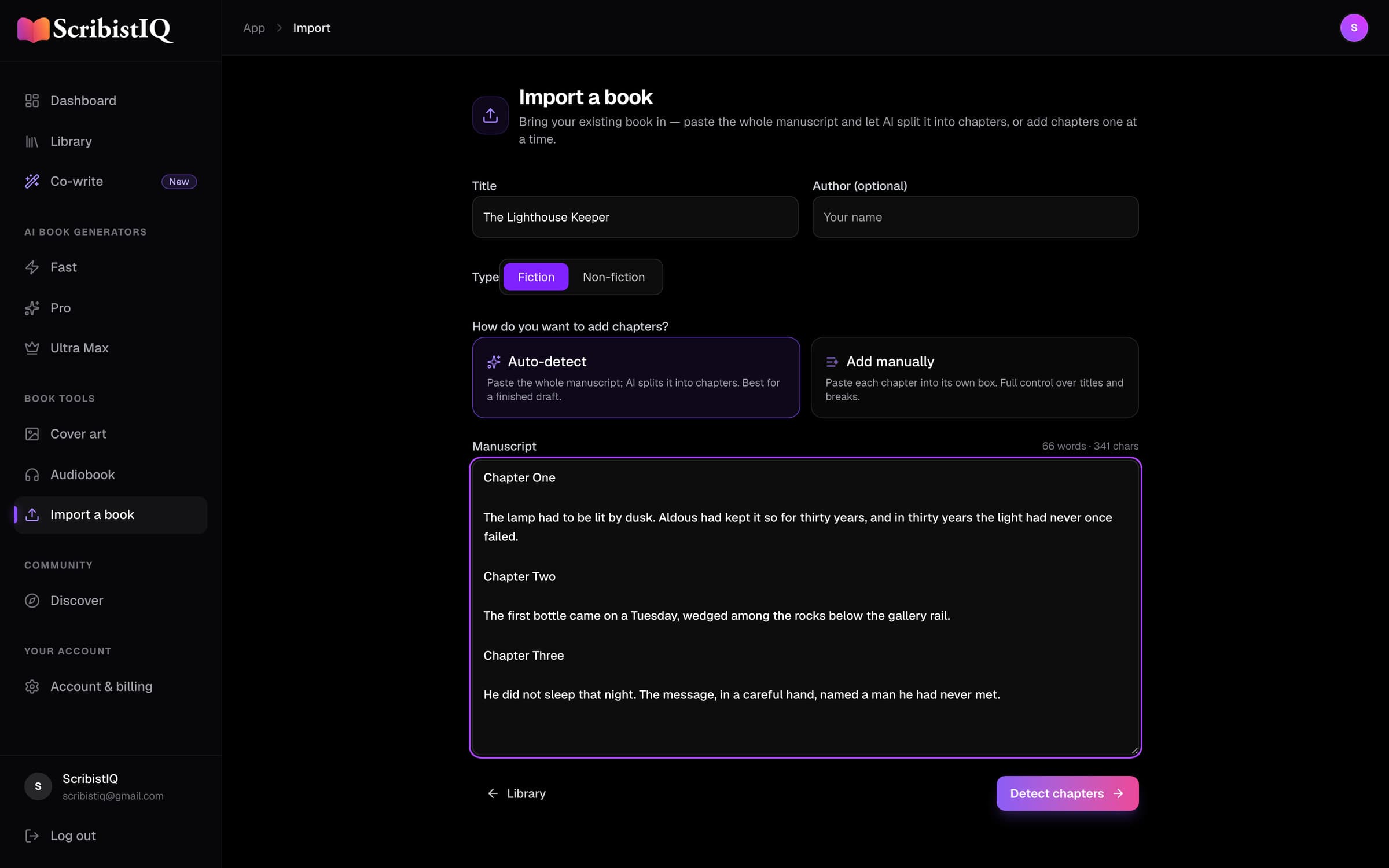
In the app, choose Import a book. Upload a .docx, .txt or .md file up to 4 MB, or paste the text. Let AI split it into chapters (10,000 credits; if the AI step can't run, you get a basic split and the credits back), or paste each chapter into its own box. Then review the chapters: rename, reorder, merge or delete them, mark the book fiction or non-fiction, and create it. A book holds up to 200 chapters and 2,000,000 characters, about 350,000 words.
- 02
Open it in Write Studio first
The first time a book opens in Write Studio (Co-write in the app's sidebar), its Story Bible is built from the manuscript: characters, places, facts and a short note on narration and voice taken from your opening. Read it and correct it. The automatic pass keeps at most 12 characters, 12 places and 12 facts, and in a long manuscript it can miss people who only arrive later, so add what matters yourself. The Bible is how anything from early in the book reaches the chapters still to come, so this step does more for consistency than any other.
- 03
Plan the next chapters
Back in your library, choose Continue book. The AI reads summaries of your latest chapters and proposes what happens next, one line per chapter. Rewrite any of them, add your own, or delete the ones you don't want, up to 12 per run. Pick Pro or Ultra quality; the dialog shows the price per chapter and the total before you start.
- 04
Let it write, then read
Chapters are written one after another, and a run usually finishes within about 15 minutes. If your draft is told consistently in the first, second or third person, the new chapters keep that point of view. If a run fails, the credits come back.
- 05
Edit it into your book
Expect to edit. The AI picks up your voice only from what it can see, mainly the closing passage of the previous chapter and the narration note in the Story Bible. In Write Studio you can rewrite, expand or shorten a passage, or continue from your cursor, at 500 credits an action (3,000 at Pro quality), within your plan's monthly allowance. On the Pro plan, Continuity Check reads chapters for contradictions at 3,000 credits a chapter and lists them for you to fix. It changes nothing on its own.
- 06
Run it again, or finish
Run Continue book again for the next stretch. When the book is done, download it as DOCX, EPUB or PDF, make a cover, or narrate it chapter by chapter. If you plan to sell it, read the publishing guide first: Amazon and Barnes & Noble count chapters an AI drafted as AI-generated even after you edit them.
What the AI reads before each new chapter
It does not reread your whole manuscript, and an imported book has no premise, so its title stands in for one. Anything from early chapters that later ones depend on, such as a scar, a promise or a secret, belongs in the Story Bible.
- Your Story Bible
- Characters, places, facts and narration notes, up to 16,000 characters of them. Only if the book has one, which happens the first time you open it in Write Studio.
- Summaries of your last 10 chapters
- Written automatically from your own chapters, including the ones you imported.
- People and places from earlier on
- Short notes on who and what was established before those chapters, so a long book doesn't lose its opening cast.
- The end of the previous chapter
- About the last 4,000 characters, roughly 700 words, so the new chapter picks up the scene and the voice.
- The chapter you approved
- The title and description you settled on in the plan.
What to expect, and what it won’t do
Your voice, approximately
There is no voice-sample setting for continuing a book. The voice carries over through the previous chapter's ending and the Bible's narration note, so plan an editing pass.
Point of view, not tense
A draft that sticks to one point of view keeps it. Tense isn't enforced, so check the first new chapter for drift.
English only
ScribistIQ writes in English.
Not on the free account
A free account writes the opening of a new book from a premise. Importing your own manuscript needs a paid plan, from $29 a month, or an active trial.
Content guidelines apply
Imported text and the chapters you plan are checked against our content guidelines before anything is written.
Private unless you share it
An imported book stays in your library. It appears publicly only if you choose to share it.
What it costs
Plans come with a monthly credit allowance. See plans and pricing for what each plan includes.
Common questions
Can AI finish a novel I already started?
Yes. Import the draft, approve the chapters the AI proposes, and it writes them in order, up to 12 per run. Run it again until the book is done, and edit anything it writes.
Will the new chapters sound like me?
Close, not identical. The AI sees the end of your previous chapter and the narration note in your Story Bible, and keeps a consistent point of view. It has no separate voice sample for a continued book, so most writers rewrite passages in the Write Studio afterwards.
Does the AI read my whole manuscript?
No. For each new chapter it reads your Story Bible, summaries of your last 10 chapters, short notes on people and places from earlier, and the last 4,000 characters of the chapter before. Put anything the ending depends on into the Story Bible.
How long can my manuscript be?
Files up to 4 MB, and up to 200 chapters and 2,000,000 characters per book, about 350,000 words.
Can I try it on my manuscript for free?
No. A free account writes the opening of a new book from a premise, so you can judge the writing before you pay. Importing and continuing your own manuscript needs a paid plan, from $29 a month, or an active trial.
Who owns the chapters it writes?
You do. Our Terms say: "As between you and us, you own the inputs you provide and, to the extent permitted by law, the output you generate." Your book stays private unless you share it.
Is my manuscript used to train AI?
Our privacy policy says we do not use your generated content to train our own models and we do not sell your content. To write your chapters, the text the AI needs is sent to the third-party AI providers described in that policy.
Can I publish a book that AI helped finish?
Yes, with conditions. Amazon, Apple and Barnes & Noble ask you to declare AI-written text, and Amazon counts chapters an AI drafted as AI-generated even after heavy editing. IngramSpark and Draft2Digital also want the book edited by a person before you upload it. Our publishing guide goes store by store.
Your draft is further along than a blank page.
Importing needs a paid plan or an active trial. A free account lets you read what the writing is like first, on a new premise.
Also worth reading: Can you publish a book written by AI? · Features · The best AI book generators