
How to turn course notes into a chapter plan for an AI-written book
Sort a course's modules into keep, merge and cut, write a short source packet, and review the chapter plan before ScribistIQ's Pro generator writes your nonfiction book.

In this guide
If you teach a course or workshop, you already have the hard part of a nonfiction book: expertise and a tested order of ideas. The risk is handing an AI book generator a pile of transcripts and slides and getting back a book that sounds like a recording. This guide shows how to turn course material into a short source packet and a chapter plan you can review before ScribistIQ's Pro generator writes any prose.[1][2]
The walkthrough uses an invented example course, Quote Without Fear, a six-part course on pricing for freelance designers. Nothing in it is a real customer, a real course or a real test run. It is based on ScribistIQ's public product pages, and the draft output is not shown because it has not been generated for this guide.[6]
What the available evidence shows
This guide rests on limited evidence of reader need. One speaker's account, dated 2026 (the page shows October 17 and April 29, 2026 without saying which is the posting date), describes recording keynotes for about a year, transcribing them, splitting the transcripts into 12 chapters and feeding sections to an AI model in chunks; the author says AI helped them write faster while the expertise remained their own. A separate vendor guide on repurposing blog content into a book (updated October 2026) is about blog-to-book rather than courses, but several of its tips transfer by analogy to spoken material: remove web-only or on-screen phrases, explain a repeated framework once, and set a one-page voice guide. Neither is a measured study, and no larger audience for this task is claimed.[4][5]
Before you start: what ScribistIQ does and does not do
- The Business preset gives each chapter one core idea, concrete cases and a closing action, and it forbids invented statistics, sources and quotations.
- Put your frameworks and experience in the premise and notes; the outline you approve becomes the book's argument, one idea per chapter. The model does no research, so your cases, data and references have to come from you.
- On Pro you review and edit the chapter plan before a word of prose is written. Pro books have 5 to 12 chapters and cost 300,000 credits; the Lite, Standard and Pro plans each include the Pro generator.
- Every new account gets a free preview of the opening chapter, about 500 to 700 words, with no card required. The pricing FAQ says paid plans start when you choose one.
- The business page says the model writes in English, so plan for English-language books; the generator produces no charts, tables or diagrams, so a worksheet or slide has to become written steps.
Step 1: Write the reader promise before touching the material
Course material is organized around what you taught. A book needs a promise about what the reader can do afterward. Write one sentence naming the reader, the situation and the result. In the example: a freelance designer with a few years of experience can write a project quote they can defend in one afternoon.
Then write what the book will not cover. The example leaves out finding clients and accounting. A narrow promise gives the generator a clear argument and makes cutting easier.
Step 2: Sort every module into keep, merge, cut or ask
Go through each module, recording, slide deck and exercise and give each one a decision. Spoken material carries habits that do not belong in print: references to the screen, audience questions that wander, tool tours that go stale and the same framework taught twice.
| Course item | Decision | Reason |
|---|---|---|
| M1 Know your costs | Keep: Chapter 1 | Directly serves the promise; the cost-floor steps become written steps. |
| M2 Scope the project | Keep: Chapter 2 | The reader needs scope before a price makes sense. |
| M3 Three-tier quotes | Keep: Chapter 3 | Teaches the anchor idea (framework 3 in the packet) most clearly, so it becomes the one definitive explanation. |
| Anchor idea (framework 3) repeated in M2 and M4 | Merge into Chapter 3 | Say it once and point back to it. |
| M4 Answer price pushback | Keep: Chapter 4 | Reader-facing scripts carry over; screen references do not. |
| M5 Contracts and deposits | Keep: Chapter 5 | Frame it as the author's own practice, not legal advice. |
| Invoice-app screen tour | Cut | Tied to video and likely to go stale. |
| Live Q&A recording | Ask, then mine | Client stories need the client's permission before they appear in a book. |
| Course exercises | Keep, rewrite as steps | Chapter 6 turns them into one task: send your first quote. |
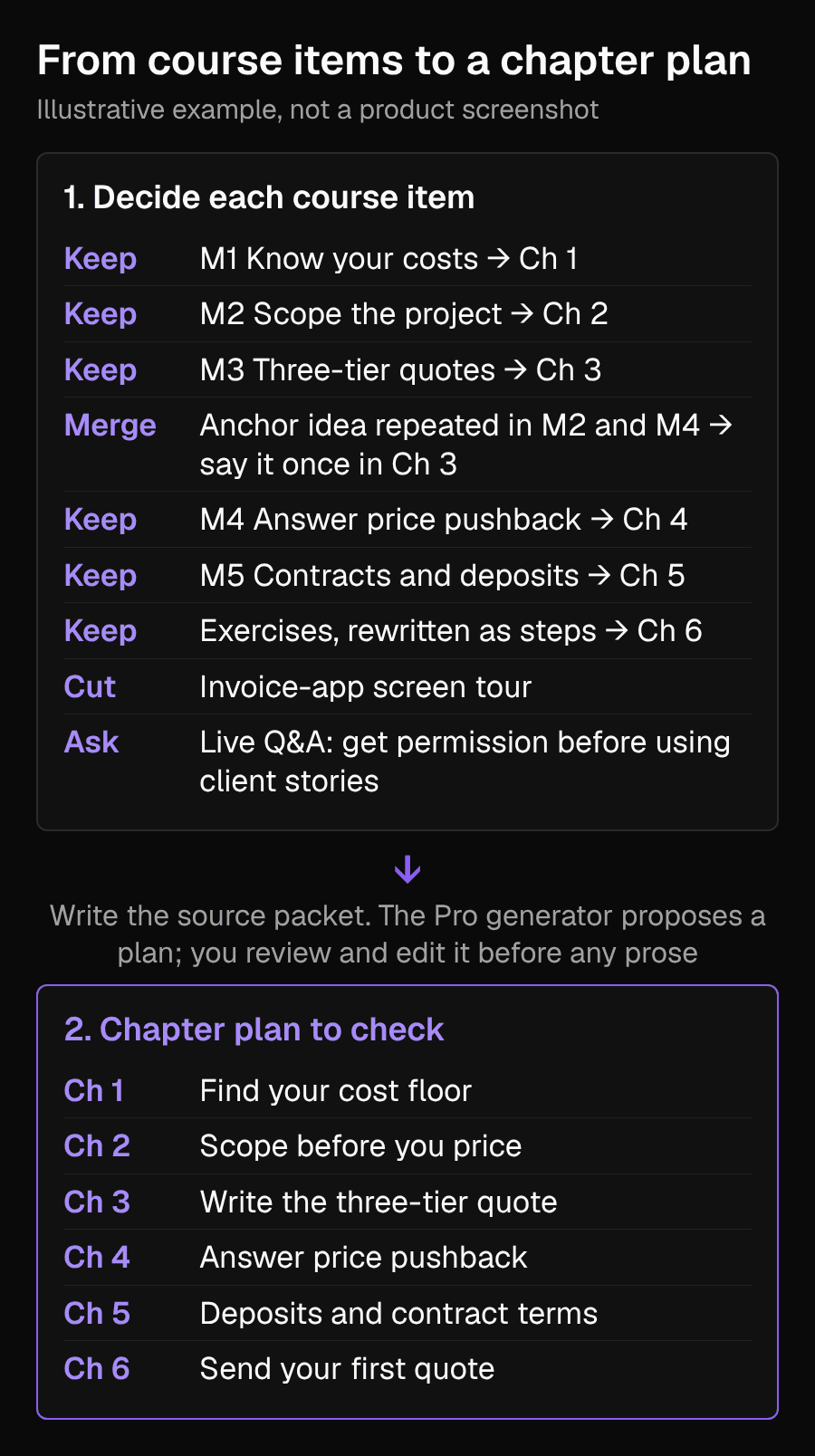
The diagram shows the same decisions item by item, then the six-chapter plan you would check after the Pro generator proposes it from your packet.
Step 3: Build a short source packet
A packet is the shortest write-up of your argument that still contains your own material. ScribistIQ's business page says the premise and notes describing your frameworks and experience become the book's argument, and that you can import notes as .docx, .txt or .md. Import files can be up to 4 MB, but a trimmed packet is easier to review than a full transcript dump.[1][2]
PREMISE: Freelance designers underprice because they guess. This book teaches a repeatable way to write a quote they can defend. READER: A designer with one to three years of client work who has quoted by gut feel. PROMISE: By the end the reader can write a three-tier quote for one real project. FRAMEWORKS: (1) Cost floor: yearly business costs plus the take-home pay you want, divided by the hours you can actually bill. (2) Three tiers: a basic, a recommended and a premium version of the same project, so the client chooses scope instead of haggling price. (3) Anchor idea: show the premium tier first, so the recommended tier is judged against it rather than against zero. MY CASES: Add only cases you lived. Example: a logo project whose scope grew because deliverables were never listed. NOT COVERED: Finding clients, accounting, legal advice. RULES: Do not invent statistics, sources or client quotes.
The three framework lines above, including the anchor idea, are the example author's invented method for this guide. Replace them with your own and keep the line forbidding invented figures, since the model will not look anything up for you.
Step 4: Add a voice sample from your writing, not your transcript
Pro and Ultra Max accept a voice sample of up to 4,000 characters; the model matches rhythm, sentence length and vocabulary, not content. Pick a paragraph you wrote and are happy with, such as a newsletter or a handout, not a speech transcript, because spoken filler would be copied as style.[2]
Step 5: Generate the plan and review it before prose
Choose the Pro generator and the Business preset, then review the chapter plan it shows before writing starts. Check it against your decisions table rather than judging whether it sounds good.[1][2]
| Check | What to look for | Fix |
|---|---|---|
| Promise | Does every chapter serve the one-sentence promise? | Delete the beat or rewrite it to point at the promise. |
| Order | Is each chapter possible only after the previous one? Cost floor before scope before quote. | Reorder the beats. |
| Duplicates | Does the anchor idea appear in more than one chapter? | Keep it in Chapter 3 and reduce the others to a reference. |
| Cut items | Has the invoice-app tour or any screen reference crept in? | Remove the beat. |
| Unknown material | Does a beat promise a case, figure or story you never supplied? | Replace it with your own case, or cut it. |
| Action | Does the last chapter end in a task the reader can complete? | Add a concrete task, such as sending a first quote. |
In the example, a good plan has six chapters matching the diagram. If the plan returns eight chapters with a separate one for client acquisition, that contradicts the not-covered line, so you would rewrite or remove that beat.
Step 6: Check the draft against your notes
When chapters are written, read each one with your packet next to it. The generator is told not to invent statistics, but check anyway. Consider reading aloud as well; this is editorial advice, not a sourced finding.[1]
| Claim in the draft (illustrative) | In my notes? | Action |
|---|---|---|
| Use three tiers: basic, recommended, premium. | Yes, framework 2 | Keep. |
| Most clients pick the middle tier. | No | Delete, or replace with a statement from your own projects. |
| Ask for a deposit before starting. | Only in M5 | Keep, and add your own terms. |
| A client quoted as saying they love tiers. | No | Delete; do not invent client quotes. |
To fix a passage, open the book in Write Studio, select the passage and ask the editor to rewrite, expand or shorten it, or describe the change you want; ScribistIQ marks up the change before you accept it. The Business preset is applied again when you use the AI assist there. Add your own data and references in the editor, because the generator does not supply them. This guide has not checked how Write Studio's other features, such as the Story Bible, behave for a nonfiction book.[2][1]
Limits and judgment calls
- This is an untested editorial method, not a measured result, and the chapter plan the generator returns will vary.
- Pro generation costs 300,000 credits per book, and Write Studio actions cost credits too; check the price shown before confirming.
- The model writes in English, and any tables, worksheets or diagrams are yours to add in another tool.
- A course recording may include other people's words, slides or images. Check permission before they appear in a book.
- Contracts and pricing advice in your book is your own practice and is not legal or financial advice.
What to do next
Write your reader promise, fill in a packet and compare the plan to the table above. If you are still deciding between generators, the comparison guide lays out the options; the co-writing guide covers editing chapters once you have a draft.[1]
Sources
- ScribistIQ business book generator pageChecked 2026-11-07
- ScribistIQ featuresChecked 2026-11-07
- ScribistIQ pricingChecked 2026-11-08
- How I Wrote, Produced, and Published Recoded (NSA Speaker, 2026)Checked 2026-11-08
- Content repurposing: blog to book, with course repurposing (Built and Written)Checked 2026-11-07
- Original illustrative worked example and diagramChecked 2026-11-07