
Can you sell an AI-narrated audiobook? Where your narrated chapters can go
Spotify and Google Play accept AI narration you upload with a disclosure; Audible's route is Virtual Voice. Store rules, file checks and a worked 12-chapter example.
In this guide
Yes, you can sell an AI-narrated audiobook, but not everywhere, and not every route accepts files you made yourself. Spotify for Authors and Google Play Books both accept audiobooks with synthetic narration that you upload, as long as you say so when you upload. Voices by INaudio (formerly Findaway Voices) accepts AI narration only as packages from a short list of named providers. Audible's own route for machine narration is Amazon's Virtual Voice beta, which narrates your live KDP ebook itself rather than taking your audio files.[6][9][11][12]
This matters if you narrated your book in ScribistIQ. Its audiobook tool narrates a chapter or the whole book in one of six voices (Bella, Sarah, Adam and Michael in American English; Emma and George in British English) and gives you one WAV file per chapter to download. There is no single combined audiobook file. Below is where those chapter files can go, what each store asks for, and a worked example of getting one 12-chapter book ready, including what the narration costs in credits.[1][2][4]
Where AI narration is accepted
Each store sets its own rule, and the rule is about two things: whether synthetic narration is allowed at all, and whether it accepts audio from any tool or only from approved providers. This table covers five routes, as their pages read on November 19, 2026. It does not cover Kobo Writing Life, Apple Books or other audiobook stores and distributors: their rules were not checked for this guide, so read each one's own help page on AI or digital narration before you rule it in or out.
| Route | AI narration? | Your own chapter files? | What you must do |
|---|---|---|---|
| Spotify for Authors (direct upload) | Accepted. Spotify lists Google Play Books, ElevenLabs 'and more' as sources. | Yes: MP3, WAV or FLAC uploads. | Tick 'This audiobook uses digital voice narration'. Spotify adds a disclosure sentence to the description and does not pass these titles to its referral partners. |
| Google Play Books Partner Center | Accepted: the narrator setting has Synthesized voice options. | Yes: MP3, AAC, FLAC, WAV, ZIP or LPF. | Set the narrator to a Synthesized voice option (Unspecified, Male, Female or Based on real actor). A narrator is required. |
| Voices by INaudio (formerly Findaway Voices) | Only through its Digital Voice Narration workflow. | No, unless they are unmodified LPF packages from Google Play Books, ElevenLabs or Spoken Press. Other providers' audiobooks cannot currently be submitted through that workflow. | Titles go only to retailers that accept digital narration, with a disclosure added to the description. |
| Audible through KDP Virtual Voice | Amazon makes the narration itself. | No: it starts from your live KDP ebook, not from audio you upload. | Invite-only beta. The ebook must be live, reflowable and in English, Spanish, Italian or French; sold in the US marketplace only. An existing Audible or ACX audiobook makes the ebook ineligible. |
| Audible through an ACX upload | Not a documented route for synthetic narration. | No documented route. | Independent author guides report that ACX rejects AI-narrated audio in its quality review. Read ACX's current audio submission requirements before you plan around it. |
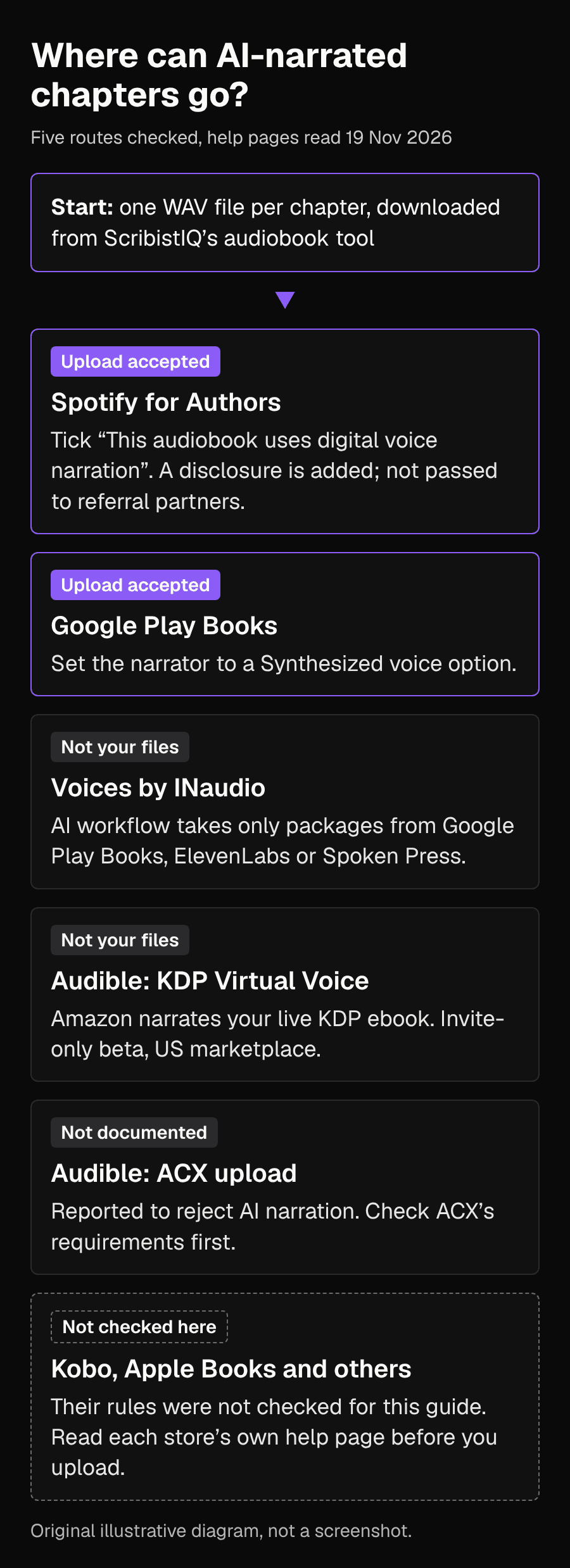
So of the five routes checked here, the two that take audio you narrated in ScribistIQ are Spotify for Authors and Google Play Books. Spotify's upload is free and non-exclusive, so you can also list the same audiobook elsewhere. If Audible matters most to you, Virtual Voice is a separate decision: it uses Amazon's narration, not yours, and requires the ebook to be live on KDP first. Neither route changes what you owe the ebook store: KDP asks about AI-generated text separately, which the publishing guide covers.[7][12][4]
What Spotify and Google Play ask for
Both stores want clean, separate files and a square cover. WAV files at 44.1 kHz and 16-bit meet both stores' WAV requirement, which makes them the simplest single target.
| Requirement | Spotify for Authors | Google Play Books |
|---|---|---|
| Audio format | MP3 at 192 kbps or higher, WAV at 44.1 kHz and 16-bit, or FLAC | WAV PCM at 16 bits and 44.1 kHz or higher; MP3 at 128 kbps mono or 256 kbps stereo or higher; FLAC; AAC |
| Files | One file per chapter, plus opening and closing credits; every file the same mono or stereo setting | Name multi-file books ID_1of12 and so on, or upload one ZIP whose files play in alphabetical order |
| Length | No chapter file longer than 2 hours | Whole audiobook between 5 minutes and 100 hours |
| Cover | Square PNG or JPEG, 3000 x 3000 pixels recommended | PNG or JPEG, 1,024 to 7,200 pixels; square recommended |
| Narrator field | Required; if no narrator is credited, use the publisher name | Required; choose a Synthesized voice option |
| Sample | Optional sample file | Default is 10% of the book, 1 to 30 minutes |
| ISBN | If you use one, it must be unique to the audiobook edition, not your ebook or print ISBN | No ISBN requirement in the Partner Center file guidelines |
Two of these catch ScribistIQ users in particular. First, ScribistIQ's cover sizes are portrait: 1600 x 2400 for ebooks and 1800 x 2700 for a 6 x 9 paperback. Neither is square, so you will need a square version of your cover art for the audiobook. You can upload your own art to ScribistIQ for free, or make the square crop in any image editor. Second, ScribistIQ's documentation does not state the sample rate or bit depth of its WAV downloads, so check the file properties of one chapter before you upload anything. If the file is not 44.1 kHz and 16-bit, export it again at those settings in an audio editor. Spotify warns that renaming a file's extension does not convert it.[1][2][8]
Worked example: one 12-chapter book, start to upload
Book: The Lantern Keeper's Daughter, a 12-chapter cozy fantasy written with ScribistIQ's Pro generator and then edited by hand. Word processor count after final edits: 62,000 words, 352,000 characters including spaces. Goal: sell the audiobook on Spotify and Google Play Books, and keep the ebook on KDP. Plan: Standard (1,500,000 credits a month).
- Finish the text first. Narration is charged per character, and ScribistIQ only promises that previously narrated chapters in the same voice are not charged again. It does not say what happens after you edit a chapter, so treat narration as the last step, after the read-through and edits.
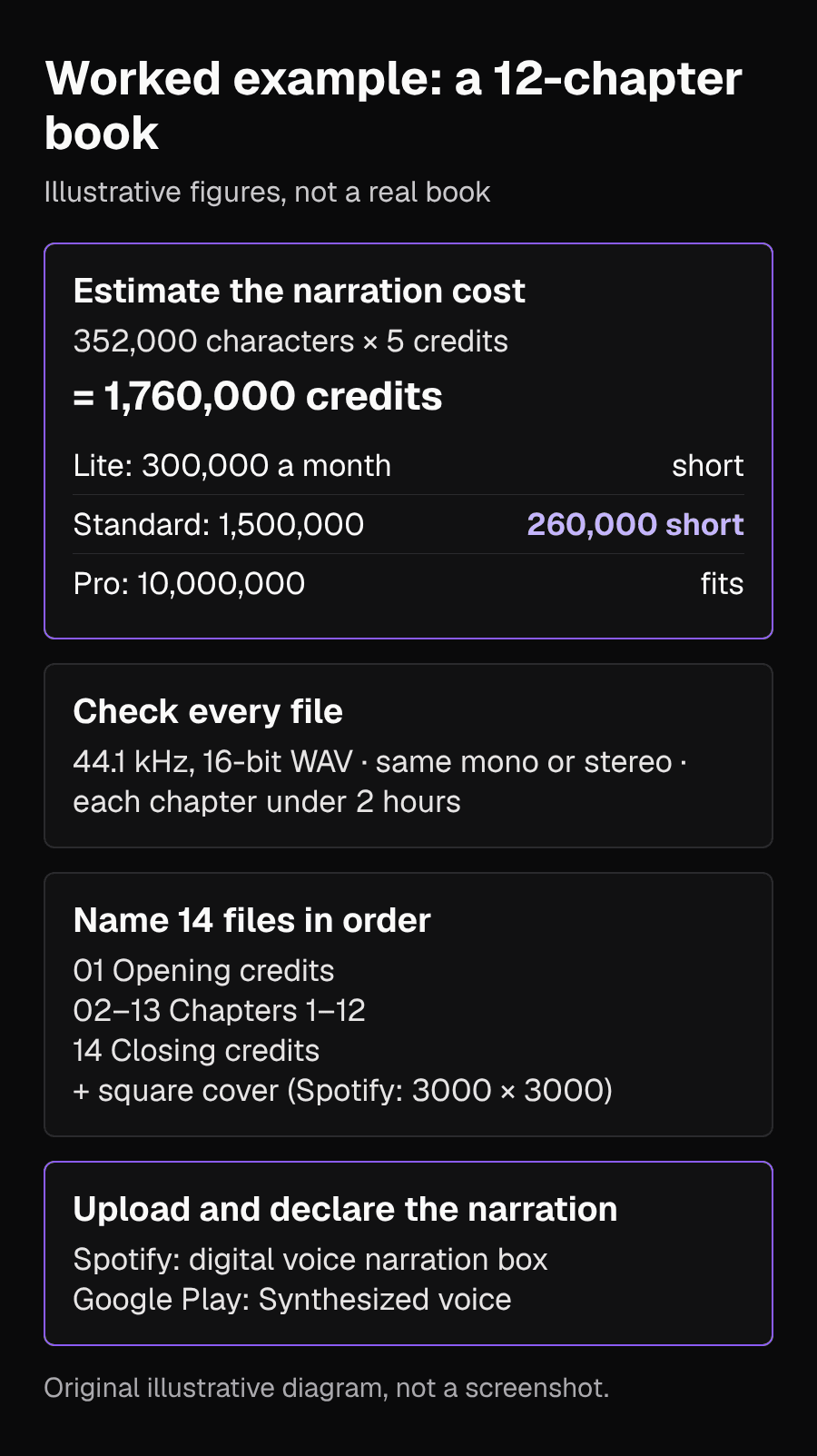
- Estimate the cost. Narration costs 5 credits per character, and the exact cost is shown before you confirm. For this book: 352,000 x 5 = 1,760,000 credits. The page does not say whether spaces count, so the with-spaces figure is an upper estimate. Compare it with your plan: Lite gives 300,000 credits a month, Standard 1,500,000 and Pro 10,000,000. Plan allowances reset monthly and do not roll over; top-up packs ($29 for 250,000 credits) do not reset.
- Choose a voice on one chapter. Narrate chapter 1, listen to it, and if you want to compare, re-narrate it in a second voice. A different voice is a new narration, so budget for it: an average chapter in this book is about 29,000 characters, or about 145,000 credits per voice.
- Narrate the rest and download every chapter. On Standard, this book does not fit in one month's allowance (1,760,000 against 1,500,000). Either buy two top-up packs to cover the gap of about 260,000 credits, or narrate chapters 1 to 10 this month (about 1,470,000 credits, if you did not try a second voice) and the last two after the allowance resets. Chapters already narrated in the same voice are not charged again.
- Check every file. Open each WAV's properties: sample rate, bit depth, mono or stereo, and length. Listen to the start and end of each chapter and to any invented names, since a name the voice misreads will be wrong in every chapter it appears in.
- Add the files the stores expect that ScribistIQ does not make: short opening and closing credits files (Spotify's upload checks look for them), a square cover and, if you want one, a sample.
- Name the files in order, for example 01-opening-credits, 02-chapter-01 through 13-chapter-12 and 14-closing-credits. For Google Play, use its ID_1of14 pattern or a ZIP whose alphabetical order is the playing order.
- Upload and declare. On Spotify for Authors, tick 'This audiobook uses digital voice narration'. On Google Play Books, set the narrator to a Synthesized voice option. Complete each store's payment and metadata fields, and leave the ebook's own KDP AI disclosure as it is.
Before you upload: rights and disclosure
- Ownership: ScribistIQ's Terms say you own your inputs and that it claims no ownership of, or copyright in, your content, including AI-generated output. The same Terms make no promise that you can register or enforce copyright in the output.
- Store rules: the Terms also say that before you sell anything made with the service you must follow the rules of the stores you use, including their rules on disclosing AI-generated content. For audio that means the Spotify checkbox and Google's Synthesized voice setting.
- Don't imply a human narrator. Credit the narration honestly; Spotify adds its own disclosure sentence, and the narrator field is required on both stores.
- The ebook is separate. Whatever you declare for the audiobook, the KDP ebook still needs its own AI-content answer.
Common problems
| Problem | What to do |
|---|---|
| Upload rejected for file type | You may have renamed a file instead of converting it. Export it again from an audio editor in a supported format. |
| A chapter is over Spotify's 2-hour limit | Split it into two files, for example 'Chapter 8' and 'Chapter 8, continued'. |
| Files have different mono or stereo settings | Export them all with the same setting before uploading to Spotify. |
| You want the book on Audible | Your ScribistIQ files are not a documented Audible route. Check whether your live KDP ebook is eligible for Virtual Voice, or plan a human-narrated edition. |
| You planned to use INaudio for wide distribution | Its AI workflow accepts only unmodified packages from Google Play Books, ElevenLabs and Spoken Press, so ScribistIQ WAV files do not qualify. |
| You want Kobo, Apple Books or another store | Those routes were not checked here. Read that store's or distributor's own help page on AI or digital narration, and confirm whether it takes audio made in another tool, before you upload. |
If you have not yet decided whether to publish the book itself, start with the publishing guide; it covers each ebook store's AI rules and the files to upload. Once the ebook and its cover are ready, the audiobook is the one format you can make from the same chapters without retyping anything.[4]
Sources
- ScribistIQ features: Audiobook, Cover art and ExportChecked 2026-11-19
- ScribistIQ FAQ: credits, audiobooks and voicesChecked 2026-11-19
- ScribistIQ pricing: plan credit allowances and top-up packsChecked 2026-11-19
- ScribistIQ guide: Can you publish a book written by AI? (audiobook question)Checked 2026-11-19
- ScribistIQ Terms of Service, last updated October 22, 2026Checked 2026-11-19
- Spotify for Authors: Digital voice narrationChecked 2026-11-19
- Spotify for Authors: Uploading audiobooksChecked 2026-11-19
- Spotify for Authors: Troubleshooting audiobook alertsChecked 2026-11-19
- Google Play Books Partner Center: Quickstart guide to add a new bookChecked 2026-11-19
- Google Play Books Partner Center: Book file guidelinesChecked 2026-11-19
- Voices by INaudio: Digital Voice Narration (DVN) FAQsChecked 2026-11-19
- Amazon KDP: Audiobooks with virtual voice eligibility and troubleshootingChecked 2026-11-19
- ScribeCount: AI Narration for Indie Authors (July 3, 2026)Checked 2026-11-19